


AI Summary
- Task UI Updates organize work into Task, Subtasks, and Artifacts, with multiple views so teams can choose the format that best fits the work. Views include the workflow canvas, dependency table, Kanban board, calendar, review, and workspace controls.
- Skills Diff Viewer makes it easier to inspect and compare skill versions across content, metadata, and child-file changes.
- Salesforce Commerce Cloud Integration (Beta) stages commerce work for review before shopper-facing changes occur. Work that can be staged for review includes products, variants, catalog images, prices, landing pages, promotions, and campaigns.
- Workflow Composer (Beta) lets enabled organizations build and refine tasks, hierarchy, and dependencies directly on the task canvas.
Marketing operations teams need a clear view of the work, the systems it touches, and the changes that require review.
Our latest release improves that control in four places.
- The Task Workspace brings Tasks, Subtasks, Artifacts and project views together.
- Skills Diff Viewer makes version changes easier to inspect.
- Salesforce Commerce Cloud Integration (Beta) stages commerce work for review.
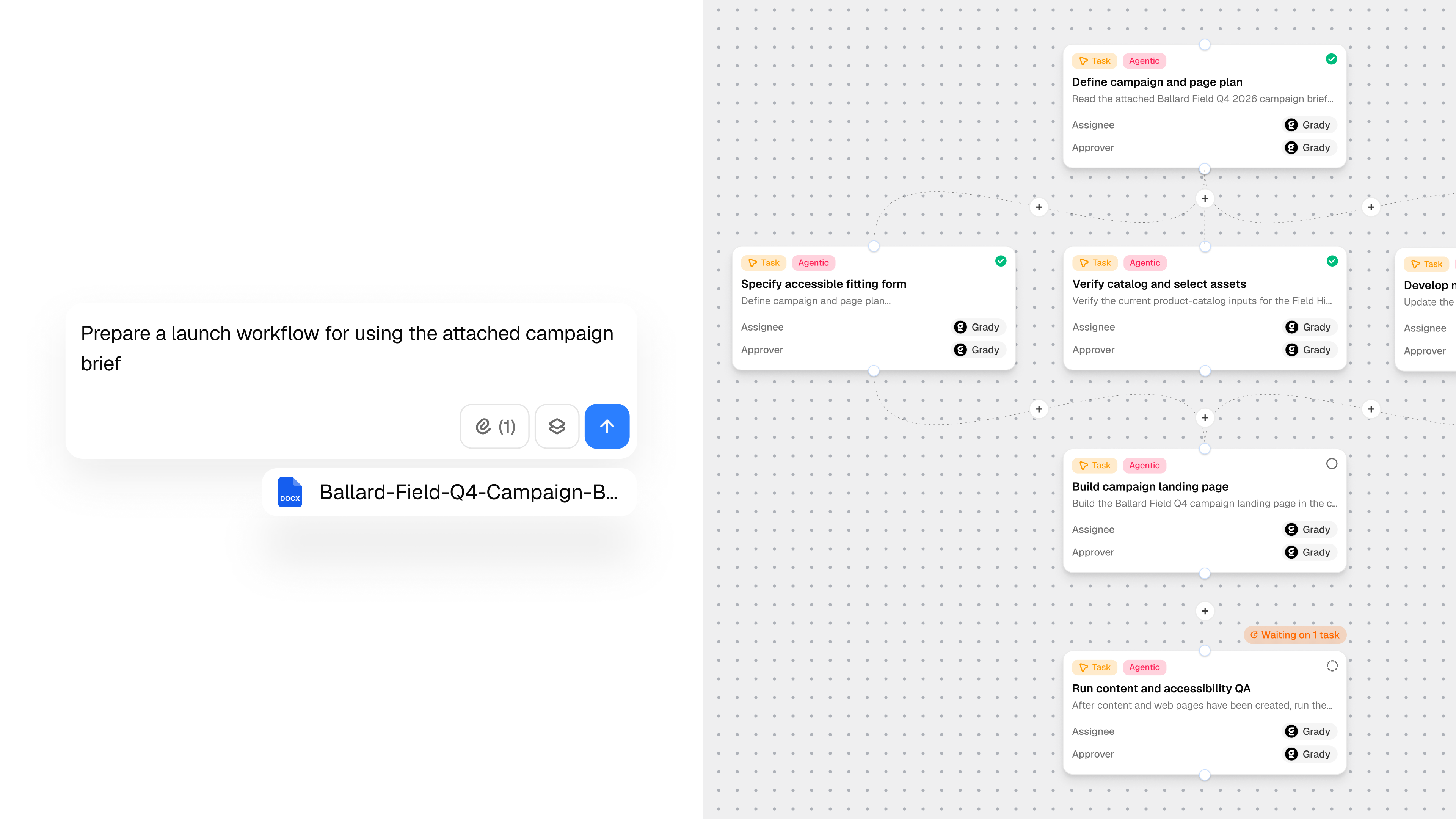
- Workflow Composer (Beta) lets teams build and refine multi-step workflows on the canvas.
The common thread is visibility and control: teams can plan the work, inspect the result, understand what changed, and keep consequential actions behind review.
Bring task work, artifacts, and project views together
Complex work becomes harder to manage when the request, outputs, dependencies, and next steps are spread across separate views.
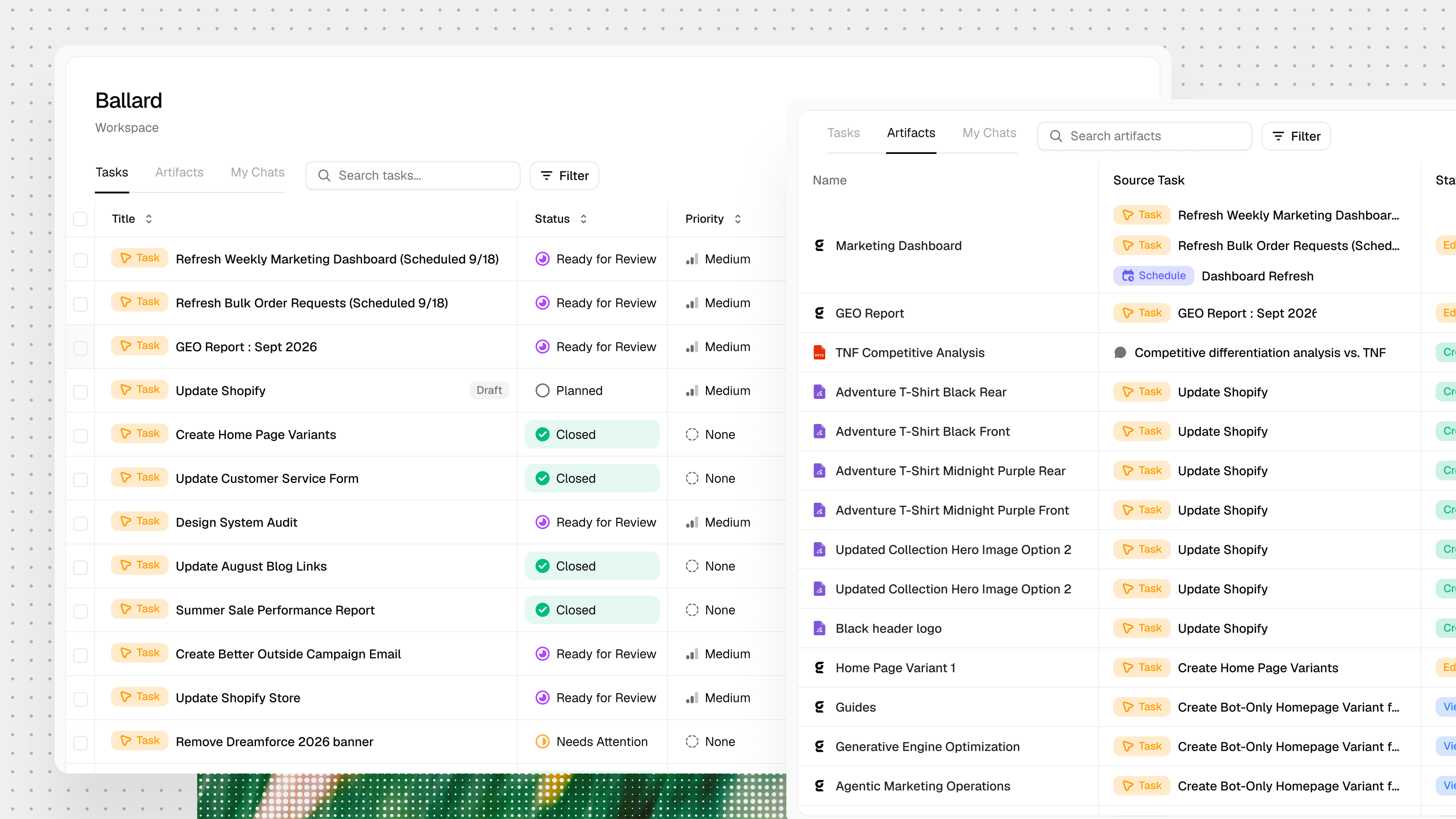
The updated task workspace organizes work into Task, Subtasks, and Artifacts, with additional views for dependencies, progress, milestones, review, and workspace control.
- Keep the request and outputs together. Task home brings the request, inputs, primary artifact previews, and related subtasks into one workspace.
- Choose the right project view. Manage subtasks through a workflow canvas, dependency table, Kanban board, or calendar.
- Review artifacts in context. Preview recent outputs or open the full artifact grid with inline thumbnails and expansion.
- Adjust the workspace. Resize, close, expand, or move the Grady workspace to either side of the task.
- See longer work lists clearly. Activity and to-do displays expand more cleanly for longer lists.
See what changed between skill versions
Reviewing a skill update requires more than checking the main content. Metadata, scope, ownership, and supporting files can change too.
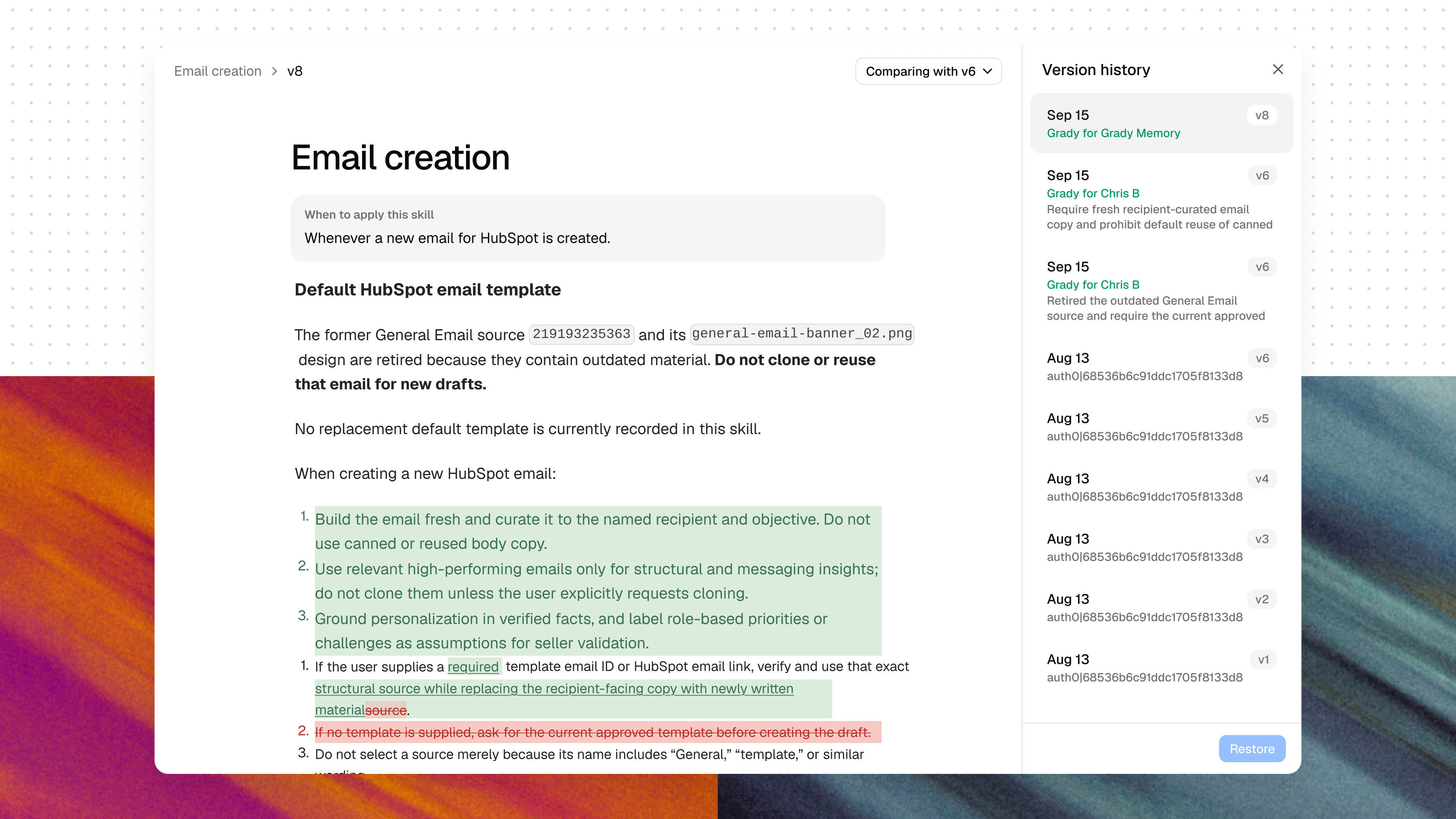
Skills Diff Viewer compares versions across content, metadata, and child-file changes.
- Compare content changes. Review the differences between skill versions.
- Inspect metadata changes. See changes to enablement status, owner, and workspace scope.
- Track supporting files. See child-file creation, modification, and deletion in parent version comparisons.
Salesforce Commerce Cloud Integration (Beta)
Commerce updates can span catalog data, pricing, images, landing pages, promotions, and campaigns. Those changes need a review path before they reach shoppers.
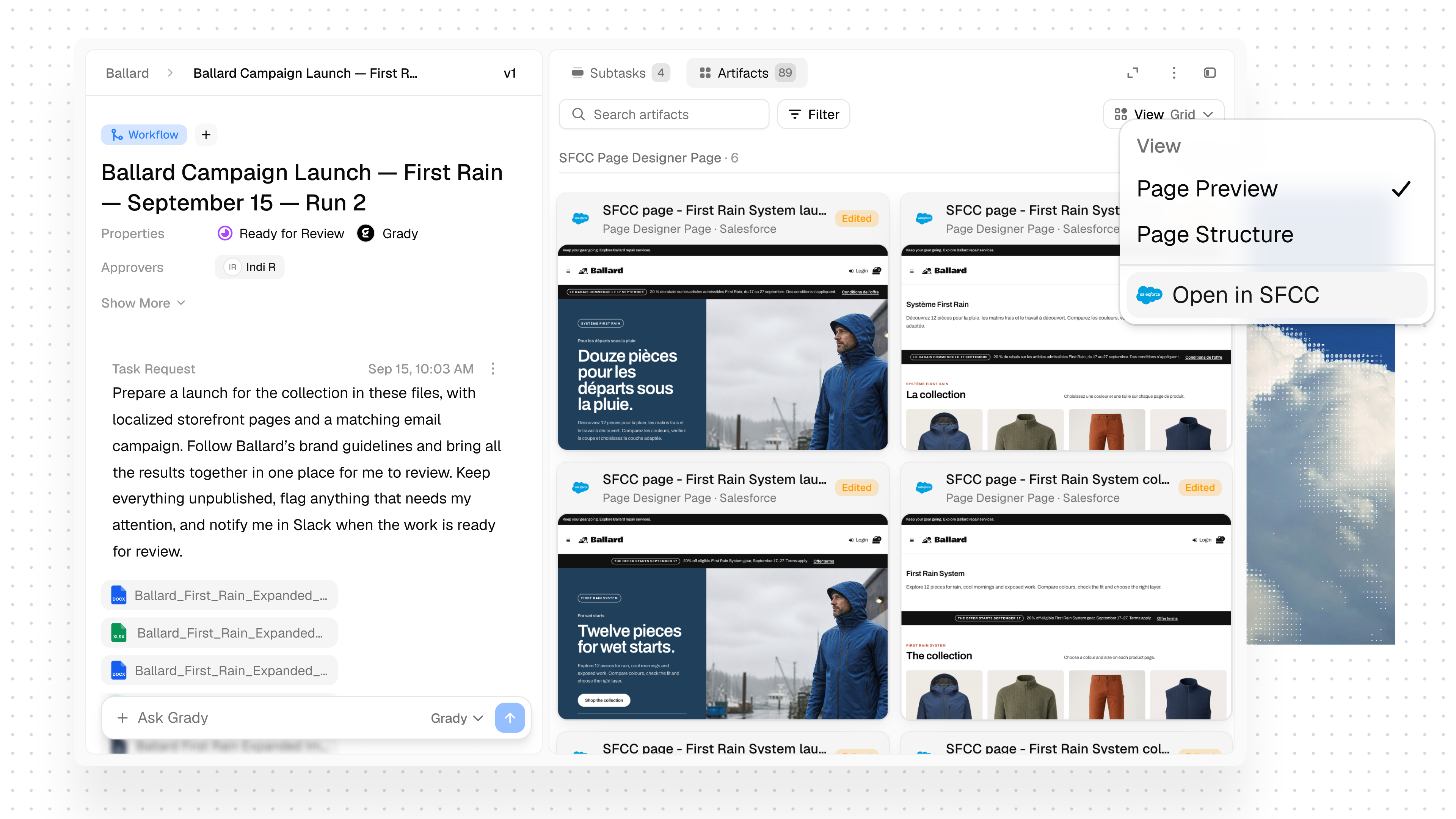
Salesforce Commerce Cloud support lets merchandising teams prepare that work in a staged state.
- Prepare catalog updates. Create staged products and variants from supplied specifications, including localized copy, SEO fields, and category assignments.
- Load supporting commerce data. Attach catalog images and load list prices through Salesforce site-import jobs.
- Build reviewable pages. Create Page Designer landing pages from registered storefront components and show an in-app draft preview.
- Keep campaigns controlled. Create campaigns and promotions disabled, with schedule windows prepared.
- Require approval for storefront changes. Storefront changes use one-time human approval, with stricter write approval on production instances.
- Protect sensitive commerce operations. Gradial does not delete products, pages, content, promotions, campaigns, or categories. Orders, customers, and payments are not touched.
Promotion discount rules, Page Designer activation, and category visibility remain in Business Manager. Unpublished product previews use a Gradial card rather than native storefront rendering. Prices and images run through Salesforce site-import jobs and may take time. Production writes require approval, and storefront changes remain blocked until an administrator opts in.
This feature is in beta, contact your Gradial team for access
Build and refine workflows on the task canvas (Beta)
Multi-step work changes as teams fill gaps, adjust dependencies, and reconnect the plan. Workflow Composer keeps those changes on the task canvas.
- Start from a blank workflow. Open Blank Workflow from the workspace Create Task menu.
- Create tasks in context. Add work where it belongs in the plan.
- Insert missing steps. Place new tasks between dependencies and reconnect work as the plan changes.
- Review the structure. See task state, hierarchy, and dependency context directly on the canvas.
- Move from planning to execution. Use canvas controls to fit the workflow, add tasks, save changes, and run the workflow.
This feature is in beta, contact your Gradial team for access
Choose your next step
See how these capabilities fit your marketing operations.
Explore the beta capabilities
See how Salesforce Commerce Cloud Integration (Beta) and Workflow Composer (Beta) fit your marketing operations workflows.
Ready to use the new features?
Open Gradial to use the updated task workspace and Skills Diff Viewer. If Task UI Updates or Skills Diff Viewer is not visible for your organization, contact your Gradial team.
New to Gradial?
Request a demo to discuss your marketing operations goals, see Gradial in action, and explore whether the beta capabilities fit your organization.
Get the latest from Gradial
Product releases, execution insights, and real-world use cases from the Gradial system of work.